First 100 spots 50% lifetime discount. Start free.
Short addresses for your files
A file in your media library has a long, machine-made address: https://cdn.clickwhale.com/1/media/restaurant_menu_winter_v2.pdf. Link files gives it a short one on your own domain instead: yoursite.com/menu. When the file changes, you point the short address at the new one and every printed flyer, QR code and old email still works.
| Where | Manage → Settings → Link files |
|---|---|
| Takes effect | Within a minute of saving, no publish needed |
The address is yours; the file behind it is swappable. Hand out /menu once, then change which PDF it serves whenever you like. The address never has to change again.
Making one
Add link to file, top right. Four fields:
| Field | What goes in it |
|---|---|
| Language | Which language of your website this address belongs to |
| URL on website | The short address, without a slash at the start: menu, winter-menu, downloads/pricelist |
| Link to file | The full address of the file, copy it from the media library |
| Login required | Off by default. On means only logged-in members can open it |
Save, and the address works within a minute. No publish is needed: the live site reads this screen, like URL redirects, from your saved settings and holds it for at most a minute.
You can also start from the Media library: click a file and choose Create direct link. The same dialog opens with the file's address already filled in.
The address is cleaned up as you type
Leave the URL on website field and ClickWhale tidies what you typed: lower case, spaces become hyphens, accented letters lose their accents, and anything that isn't a letter, digit, hyphen, underscore or slash is removed.
That includes the dot, so you can't keep the file extension. Typing menu.pdf gives you menupdf. Use menu. The file still downloads as a PDF, because ClickWhale sends the real file type along with it. The address just doesn't say so.
Slashes survive, so downloads/pricelist works and gives you a tidy yoursite.com/downloads/pricelist.
One address per language
On a multi-language website the short address lives under the language prefix, so the list shows it as nl/winter-menu, and a visitor opens yoursite.com/nl/winter-menu.
A file address only answers in its own language. If you want the same PDF reachable in both, make two entries pointing at the same file, one per language. On a single-language site there's only one choice, so it doesn't come up.
Login required
Switch it on and the file is only served to a visitor who is logged in as a member. Anyone else gets your "not logged in" page.
This needs the Members module switched on and members set up. Without them there's nobody who can be logged in, and the file simply becomes unreachable. See Settings → Website settings for the module switch.
Changing the file later
Click the pencil on the row, paste the new file's address into File, save. The short address is unchanged, so everything pointing at it now gets the new document.
Uploading a new file over an old one keeps showing the old version to visitors; uploading under a new name and repointing the short address doesn't. See Uploading and managing your files.
Linking to something other than a file
The File field takes any address, not just one from your media library. Point a short address at a form on another service, at a booking system, at a document in someone else's cloud, anything with a URL.
Two things to know if you do:
- ClickWhale fetches it and serves it from your domain. The visitor never sees where it really came from and their address bar stays on your site. That's neat for a PDF and wrong for a web app. A page fetched this way arrives without its own scripts and styles working.
- The address has to be publicly reachable. Anything behind a login on the other end returns nothing.
Choosing a good address
- Short enough to say out loud.
/menubeats/restaurant-menu-winter-2026, and it survives next winter. - Don't date them. The date belongs in the file name, not in the address you printed.
- One per thing, not one per version.
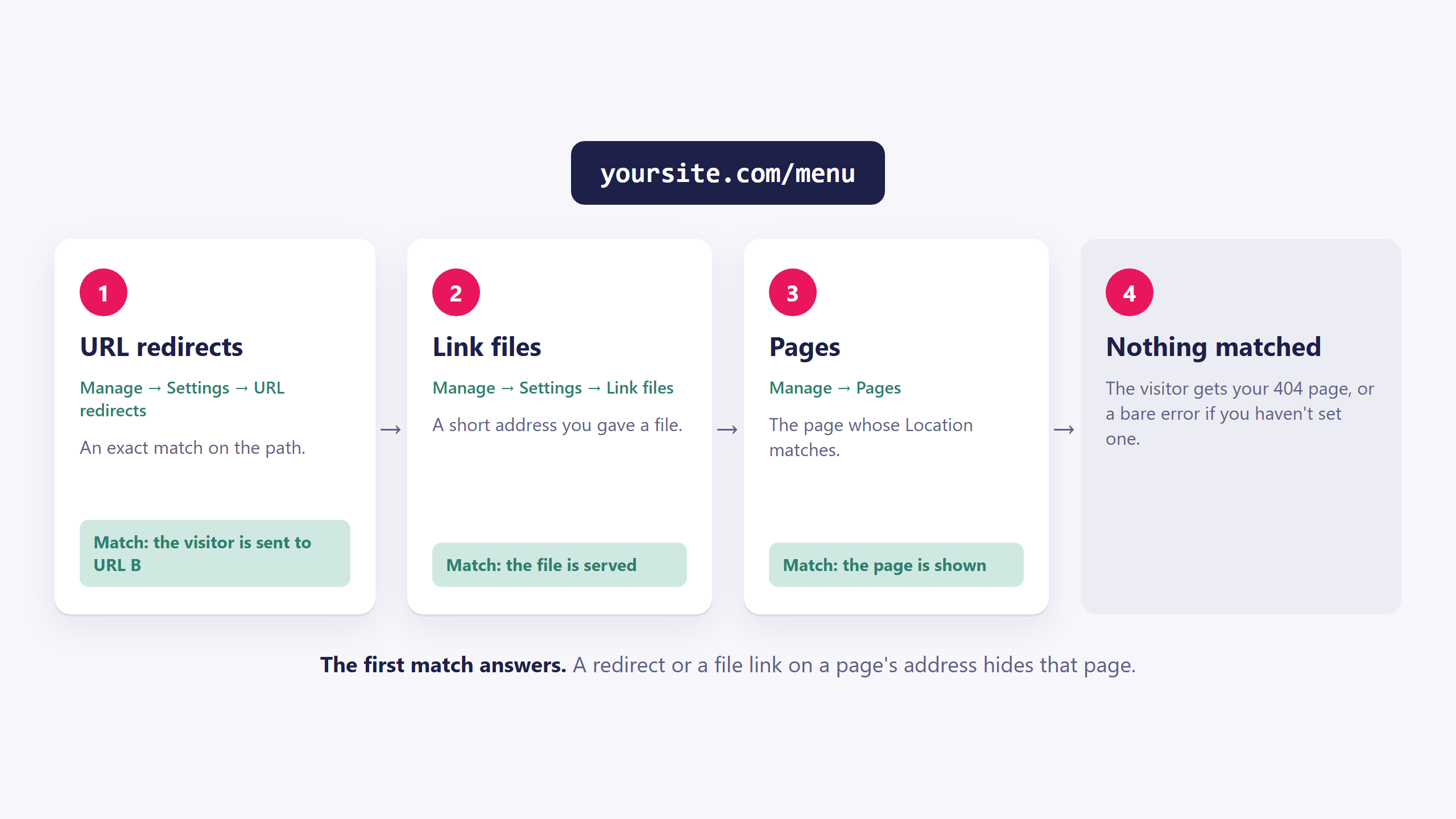
/pricelistforever, repointed twice a year. - Don't collide with a page. A file address is checked before pages, so a short address that matches a page's address hides the page.
Common issues
I get a 404 at the short address.
keyboard_arrow_down
remove
Three usual causes: the language is wrong for the address you're testing, the URL field has a leading slash it shouldn't have, or you typed the address with an extension that got stripped when you saved. Look at the row and copy exactly what it shows.
It works in English but not in Dutch.
keyboard_arrow_down
remove
File addresses are per language. Add a second entry for the other language, pointing at the same file.
The file downloads but it's the old version.
keyboard_arrow_down
remove
Check what's in the File field. A short address doesn't follow a file you replaced in the media library, it points at the address you gave it. Repoint it at the new upload.
I typed menu.pdf and got menupdf.
keyboard_arrow_down
remove
Dots are stripped from the address. Use menu; the download still opens as a PDF.
A page on my site stopped working.
keyboard_arrow_down
remove
A file address with the same path as a page wins. Rename one of them.
Visitors get the 'not logged in' page.
keyboard_arrow_down
remove
Login required is on. Switch it off, or check that the Members module is on and the visitor has an account.
Nothing comes back at all.
keyboard_arrow_down
remove
The address in the File field can't be fetched. Check it by pasting it into a browser. A file that needs a login, or an address with a typo, returns nothing and ClickWhale falls through to the normal page lookup.
What will you create today?

ClickWhale is a website management system created by Ikabus