First 100 spots 50% lifetime discount. Start free.
Sending an old address to a new one
When you rename a page, its old address stops working, and every link to it, every bookmark and every search result still points there. A URL redirect catches those visitors and forwards them to the new page instead of showing them an error.
| Where | Manage → Settings → URL redirects |
|---|---|
| Takes effect | Within a minute of saving, no publish needed |
A redirect goes live without a publish. The live site picks it up within a minute of saving, so take care when you experiment on a live site.
Adding one
Add permanent redirect, top right. Three fields:
| Field | What goes in it |
|---|---|
| URL A | The old address, starting with a slash: /old-page |
| URL B | Where to send them: /new-page, or a full https://… address on another site |
| HTTP Redirect status | Permanent or Temporary |
Save, and it works within a minute. Type the address in a private window to check.
Always start URL A with a slash, and leave off the domain. It's a path on your own website, not a full address. URL B may be either.
Permanent or temporary?
| Use it when | What it tells Google | |
|---|---|---|
| Permanent | The page has moved for good, renamed, merged, restructured | Forget the old address; the new one replaces it, along with its search ranking |
| Temporary | The page is away for a while, a seasonal offer, a page being rebuilt, a campaign that will come back | Keep the old address indexed; this is a detour |
Permanent is almost always the right answer. Choose Temporary only when you genuinely intend the old address to work again, because a temporary redirect leaves search engines pointing at an address that doesn't currently show anything.
Both are invisible to the visitor: they type the old address and land on the new page, with the new address in the bar.
Editing and deleting
The pencil on a row edits URL B and the status code only. The old address is fixed, because it's what identifies the redirect. To change the from address, delete the row and add a new one.
The bin deletes it, with a confirmation naming both addresses.
Rules for redirects
Two, and they stop you building something that loops:
- URL A and URL B can't be the same. A page can't redirect to itself.
- URL B can't be an address that already redirects somewhere else. If
/a→/bexists, you can't add/c→/a. Point/cstraight at/binstead.
Both refusals show as URL B cannot match an existing URL A.
What a redirect matches
It's an exact match on the path:
- No wildcards.
/blog/*is not a thing; each address needs its own row. - Case matters.
/Contactand/contactare two different addresses. - On a multi-language site, include the language. The redirect is checked before ClickWhale works out which language you're on, so the old address is the whole path:
/en/old-page, not/old-page. A page that existed in two languages needs two redirects. - The query string is ignored.
/old-page?ref=flyermatches a redirect for/old-page, and the?ref=flyeris dropped on the way through.
Redirects take priority over pages
A redirect is the very first thing checked on every request. Before the page lookup, before the language, before anything. So if you create a redirect whose URL A is the address of a page that still exists, the page becomes unreachable. Nothing warns you.
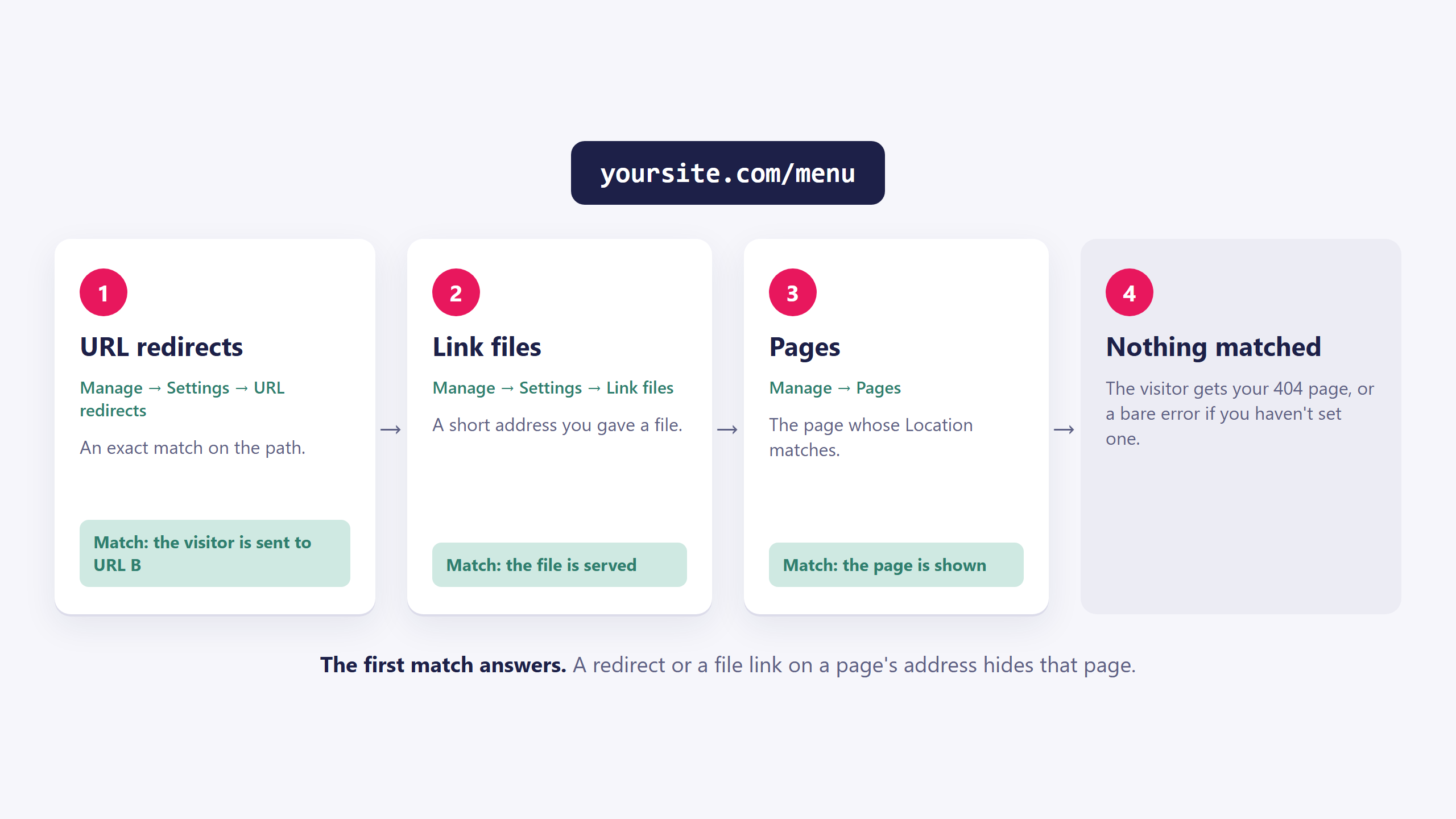
That's occasionally what you want (retiring a page without deleting it). Much more often it's the explanation for "this page vanished and I don't know why".
When to use a redirect
- You renamed a page or changed its address. ClickWhale doesn't leave anything behind at the old one, so this is the moment.
- You moved from another website. Take the old site's most-linked addresses and point each at its new equivalent. It's the single biggest thing you can do to keep your search ranking through a rebuild.
- You want a short address to hand out.
/offer→ a long campaign page. - A page is gone for good and has no successor. Then don't: let it 404. Redirecting everything to the home page is worse than an honest error page for both visitors and search engines.
For a short address that points at a file rather than a page (a PDF menu, a price list) use Short addresses for your files instead.
Common issues
I typed the old address and still got a 404.
keyboard_arrow_down
remove
Check for a leading slash on URL A, check the spelling, and on a multi-language site check that the language prefix is included. If you saved it a moment ago, give it a minute.
It works for me but a colleague still sees the old page.
keyboard_arrow_down
remove
A permanent redirect is cached hard by browsers. Ask them to try a private window. Your own browser will do the same to you if you tested the address before you added the redirect.
A page I didn't touch has disappeared.
keyboard_arrow_down
remove
Look for a redirect whose URL A is that page's address. A redirect always wins.
It won't let me save.
keyboard_arrow_down
remove
Either URL A equals URL B, or URL B is an address that already redirects somewhere else. Point it at the final destination instead.
I want to redirect a whole folder.
keyboard_arrow_down
remove
Not possible: there are no wildcards. Add one row per address.
The redirect works but drops the rest of my link.
keyboard_arrow_down
remove
Anything after ? is not carried across. If the campaign tag matters, put it on URL B.
I redirected to another website and it doesn't go.
keyboard_arrow_down
remove
URL B needs the full address including https://.
I changed my mind and it still redirects.
keyboard_arrow_down
remove
Delete the row, and then clear your browser cache or use a private window, because a permanent redirect is remembered locally for a long time.
What will you create today?

ClickWhale is a website management system created by Ikabus