First 100 spots 50% lifetime discount. Start free.
Your subscription, and what happens when it runs out
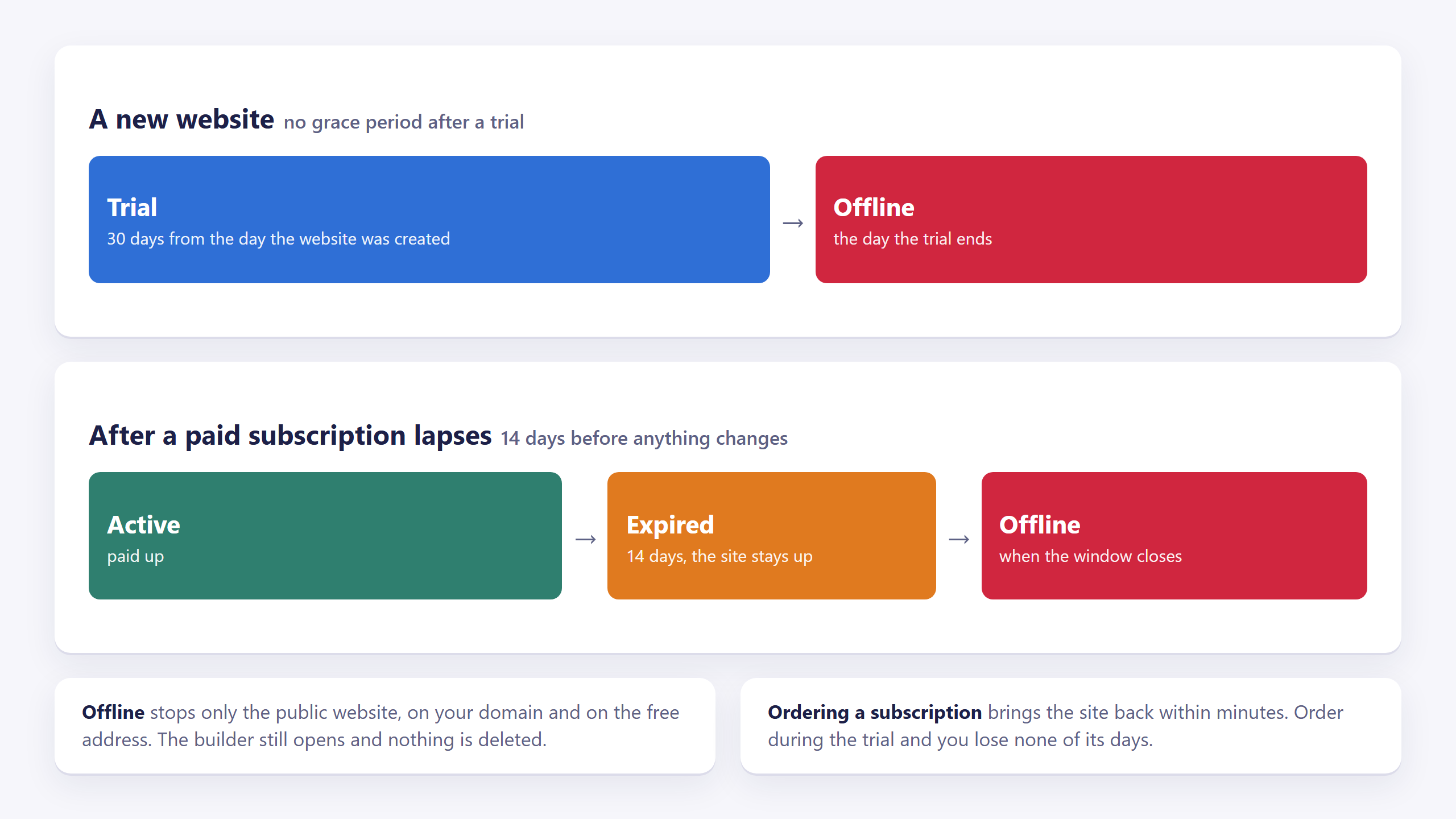
Every website you create starts on a trial. When that runs out, or when a subscription you were paying for lapses, your website goes through a short sequence of states, and only the last one has any effect on your visitors.
| Where | Account portal → Websites → your website → Subscription, at the top of the page (not in the builder) |
|---|---|
| Needs | The Admin or Owner role on the website |
Your work is never at risk. Even in the very last state (where visitors can no longer reach the website) the builder still opens and everything you built is exactly where you left it. Paying puts the site back online; nothing has to be rebuilt.
The four states
The Subscription section shows a coloured badge:
| Badge | What it means | What your visitors see |
|---|---|---|
| Trial | A new website, for 30 days from the day it was created. | The website, in full. |
| Active | A subscription is running and paid up. | The website, in full. |
| Expired | A subscription you were paying for has lapsed, and a 14-day window is still running. | The website, in full, nothing has changed yet. |
| Offline | The window closed. | A ClickWhale page saying the website is temporarily unavailable, with a link to reactivate it. |
The builder shows you the same thing as a banner across the top: blue while you're on trial and counting the days down, orange once a subscription has lapsed, red once the site is offline. The banner is a link straight to the order screen.
A trial that runs out goes straight to Offline. The 14-day window only exists after a subscription that was actually paid for at some point. A trial gets no such window: the day it ends, the website stops answering. If you plan to keep the site, order before the trial is out.
What "Offline" means
Only the public website stops. Concretely:
- Anyone visiting your website (on your own domain or on the free address it came with) gets a ClickWhale page instead of your site, with a button to reactivate.
- The builder opens as normal. You can keep editing, saving and publishing.
- Nothing is deleted. Your pages, images, forms, publications and settings all stay.
- Ordering a subscription brings the site back within minutes, without any further action.
Ordering a subscription
Press Add subscription in the Subscription section, or click the banner in the builder. The order screen has two steps.
1. Choose products. There is one package, at €15 per month. The default billing cycle is annually: the price is quoted per month, and the invoice covers twelve of them at once.
Under the package you choose what to do about a domain:
| Option | What happens |
|---|---|
| Continue without a domain | Your site stays on the free address it already has. You can add or buy a domain later. |
| Register a domain | Type the name you want, extension included (example.com). The screen tells you straight away whether it's available. The domain's price for the year is added to the order, and the domain is registered for you once the payment settles. |
Under that, Total shows what you'll pay, VAT included, and any discount. It changes along with the domain and the billing details.
2. Billing details. If you've ordered from us before, pick one of your existing sets of details and everything is filled in. Otherwise fill in your name, address and country. The country decides the VAT treatment, so it isn't optional.
Continue to payment takes you to the payment provider. If the domain is taken, or it has an extension we don't sell, the order screen tells you before anything is charged.
Paying during your trial never costs you the days you had left. If you order on day 2 of a 30-day trial, your paid period is extended so that it can never end earlier than the trial would have. You lose nothing by paying early.
Coming back from the payment screen
You get sent back to the same place whether you paid, cancelled, or let the payment expire. The portal checks what actually happened and tells you one of three things:
- Thank you for upgrading: the payment landed.
- Your payment was not completed: it failed, expired or was cancelled. Nothing has been charged and you can start again whenever you like.
- We have not received confirmation of your payment yet: the payment is real but still settling. Wait a moment and refresh the page. This is normal and usually resolves in seconds.
If you leave the payment screen without paying, nothing is lost: the order is on the website page as an open invoice under Invoices, with a Pay button.
If the payment could not be started at all, the order screen says You have an unfinished order, with the lines you chose, and two buttons: Pay order to try the payment again, or Start over to discard it. Filling in the form again replaces it too.
Renewals and invoices
Once you're subscribed, the Subscription section lists what you have: the product, the start date and the next due date. Below it, the Invoices section lists every invoice for this website: invoice number, date and due date, state and total. A paid invoice can be downloaded as a PDF; an open one has a Pay button.
Invoices for anything that isn't tied to one website (credits, for instance) are on your Profile page instead.
Common issues
I don't see a Subscription section at all.
keyboard_arrow_down
remove
You have access to the website but not as an Admin. The page says so: you can edit the website, but its subscription, access and domains are managed by the owner. Ask whoever invited you.
I paid and the badge still says Trial or Expired.
keyboard_arrow_down
remove
The confirmation from the payment provider can take a few seconds to arrive. Refresh the page. If it still hasn't changed after a couple of minutes, press Pay next to the invoice under Invoices. If the payment already went through, that records it on the spot instead of starting a second payment.
My website is offline but I can still edit it.
keyboard_arrow_down
remove
Offline only stops the public website. See What "Offline" means above.
The order screen shows an unfinished order.
keyboard_arrow_down
remove
Pay it with Pay order, clear it with Start over, or fill in the form again: a new order replaces the unfinished one.
An old order is stuck and I can't get rid of it.
keyboard_arrow_down
remove
If its payment failed, expired or was cancelled, the invoice gets a Cancel button next to Pay in the Invoices section. Cancelling it clears the order and lets you start again. An invoice that is merely still open has no Cancel button, because a payment may yet arrive for it.
I paid but the website still shows the old content.
keyboard_arrow_down
remove
That's a different problem. See "I changed it and the website didn't change".
What will you create today?

ClickWhale is a website management system created by Ikabus